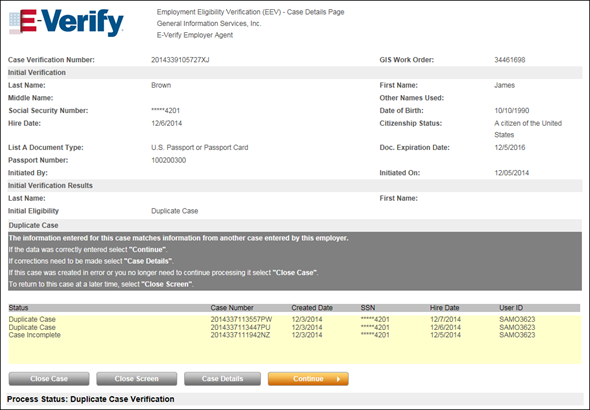
Case Details - Duplicate Case
A Duplicate Case status is returned by E-Verify when information for the current case matches another case submitted within the past 30 days. When a case receives this status, you must continue with creating the new case without making any changes, update the case information and continue, or close the current case before you can proceed.
Case Details - Duplicate Case
To Resolve the Duplicate EEV Case
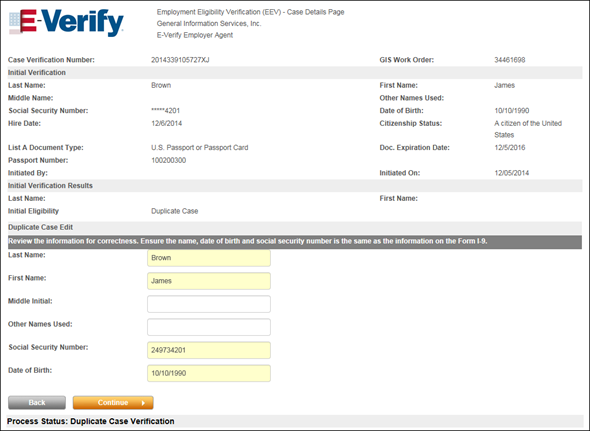
Case Details - Duplicate Case Edit
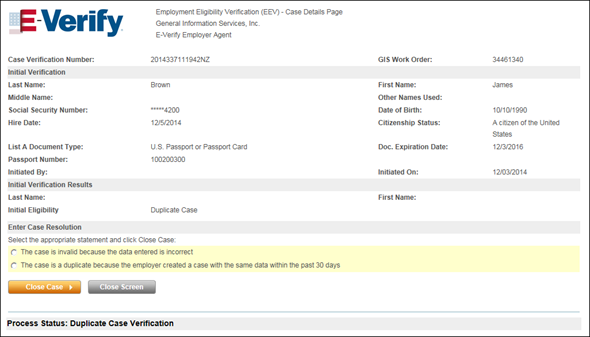
Case Details - Enter Case Resolution

|
In some cases, a problem may occur during when determining eligibility with the SSA or DHS. In these cases, the Enter Case Resolution section on Case Details page refreshes to display a single radio button with the statement “This case is being closed because of technical issues with E-Verify." Under these circumstances, you must close the current case and then resubmit a new EEV/E-Verify case for the employee by reassigning the Form I-9 completion task to the employee. |
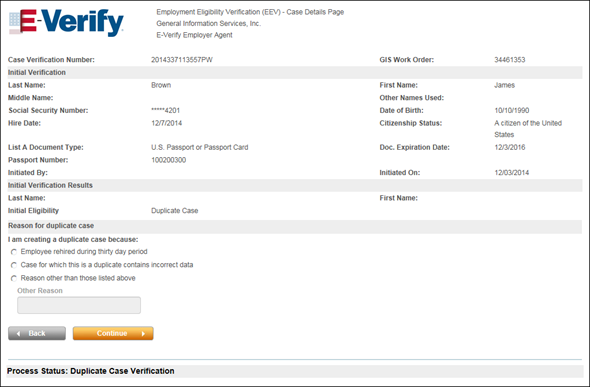
Case Details - Reason for Duplicate Case

 Related Topics